Deep Dive · 31 slides

Components of a
Coding Agent

How tools, memory, and repo context make an LLM useful — and how GitHub Copilot in VS Code maps to each piece.

Based on · Sebastian Raschka
magazine.sebastianraschka.com
Ref · Copilot in VS Code
code.visualstudio.com/docs/copilot
Framing 02 / 31

From Model to Agent

Much of the recent progress in practical LLM systems is not about better models — it is about how we use them.

Engine

LLM

The raw next-token model. General-purpose, stateless, one shot at a time.

Beefed-up engine

Reasoning model

An LLM trained or prompted to spend more inference-time compute on intermediate steps and self-verification.

The vehicle

Agent harness

A control loop around the model that observes, inspects, chooses, and acts — with tools, memory, and feedback from the environment: test results, command output, file changes, and other signals that shape the next step.

Framing 03 / 31

The agent loop

A coding harness is a model family plus an iterative loop plus runtime supports.

01 · Observe
Collect

Gather information from the environment — repo state, file contents, tool output.

02 · Inspect
Analyze

Interpret what was observed. What does it mean for the task?

03 · Choose
Select

Pick the next step: call a tool, ask the user, edit a file, or stop.

04 · Act
Execute

Run the chosen action, feed results back into the loop, repeat.

observe → inspect → choose → act loop until done
Framing 04 / 31

The coding harness does
most of the work

The harness is the software layer around the model. It assembles prompts, exposes tools, tracks file state, applies edits, runs commands, manages permissions, caches stable prefixes, and stores memory.

When the top models like Claude Opus 4.6 and GPT-5.4 are close in raw capability, the harness is what distinguishes one product from another.

The claim
A lot of apparent “model quality” is really context quality.
CLI
Claude Code, OpenCode, Pi, ...
IDE
VS Code with GitHub Copilot, Cursor, Antigravity,...
The six components 05 / 31

Six building blocks of a coding agent

01

Live Repo Context

Gather stable facts about the workspace up front so the model isn't starting from zero.

02

Prompt Shape & Cache Reuse

Separate the stable prefix from the changing tail so repeated turns stay cheap.

03

Structured Tools & Permissions

A named tool vocabulary with validation, path checks, and approval gates.

04

Context Reduction

Clip, deduplicate, and summarize so the prompt doesn't bloat across turns.

05

Structured Session Memory

A full transcript for resumption and a lighter working memory for task continuity.

06

Bounded Subagents

Delegate side tasks to child agents with inherited — but constrained — context.

Component 01 06 / 31
01

Live Repo Context

Collect stable facts about the workspace before any work begins.

01 · Live Repo Context 07 / 31

“Fix the tests” is not self-contained.

The agent needs to know the repo root, branch, layout, and any project instructions before it can act.

and user-level instructions act as a stable long-term memory

Concept · the workspace summary

Stable facts, up front
  • Is this a Git repo? Which branch, which working tree?
  • Is there a README or AGENTS.md that names the test command?
  • What is the repo layout — where should new code live?
  • What is in progress according to git status?

Copilot in VS Code

Workspace awareness
  • #codebase and @workspace expose the open folder as grounding for every chat turn.
  • Copilot indexes files, symbols, and Git state so answers reference what's actually checked out.
  • Repo guidance can come from AGENTS.md, .github/copilot-instructions.md, and scoped *.instructions.md files.
  • Skills are selected on demand by matching their description to the current task, then loaded only when relevant.
  • Open editors, selections, and terminal output are attached automatically.
Component 02 08 / 31
02

Prompt Shape & Cache Reuse

Separate what rarely changes from what changes every turn.

02 · Prompt Shape & Cache Reuse 09 / 31

Stable prefix + changing tail

Don't rebuild everything as one undifferentiated prompt. Keep the stable part stable so the runtime can reuse its cache.

Stable
prefix
General instructionsAgent rules, style, tone
 
Tool definitionsNames, schemas, descriptions
 
Workspace summaryRepo facts from the repo context
Changing
tail
Short-term memoryDistilled task state
 
Recent transcriptLast N turns, compressed
 
User requestThe new message

Copilot in VS Code

Prompt assembly &
customization
repo rules
copilot-instructions.md adds project-wide rules to every turn.
scoped rules
.instructions.md targets folders or file types via applyTo.
prompt files
.prompt.md saves repeatable tasks as slash commands.
modes / agents
Preset prompts, tool access, and behavior for planning, editing, or review.
models
Pick different models for different jobs without changing the harness.
context vars
#file, #selection, #symbol attach the changing tail each turn.
Component 03 10 / 31
03

Structured Tools & Permissions

A named tool vocabulary, validated, optionally gated by approval.

03 · Structured Tools & Permissions 11 / 31

The harness gives the model less freedom — and more usefulness.

Concept · tool-call lifecycle

Emit → validate → approve → run
  • The model emits a structured action, not free-form shell.
  • Runtime checks: known tool? valid args? path inside workspace?
  • Optional approval gate for anything that mutates the world.
  • Only clipped, filtered, or summarized results flow back into the loop.

Copilot in VS Code

Agents (former chat modes) & tool sets
  • Ask explains, Edit proposes diffs, Agent can run tools and terminal commands autonomously.
  • Built-in tools: read/write files, codebase search, terminal, tests, problems panel, Git.
  • Any MCP server can be registered as an additional tool set.
  • Default approvals use your configured confirmation rules, Bypass approvals auto-approves every tool call, and Autopilot runs a full autonomous loop end to end — effectively a bounded "Ralph Loop."
Component 04 12 / 31
04

Minimizing Context Bloat

Clip, deduplicate, summarize. A lot of “model quality” is context quality.

04 · Minimizing Context Bloat 13 / 31

Long context is expensive — and noisy.

Concept · compaction strategies

Keep recency rich, older history cheap
  • Clipping — cap any single snippet so no one tool output takes over the prompt.
  • Deduplication — collapse repeated file reads into one canonical view.
  • Summarization — compress older turns more aggressively than recent ones.
  • Net effect: recent events are rich, distant events are a paragraph.

Copilot in VS Code

Summarize & start fresh
  • Summarize Conversation — distills the current chat into a compact recap that seeds a new session.
  • Context is tracked per chat, and a high-water warning suggests compaction before the window fills.
  • File attachments and tool outputs are referenced by handle, not copied in full on every turn.
  • “New Chat” is the deliberate reset — cheap to branch a fresh session.
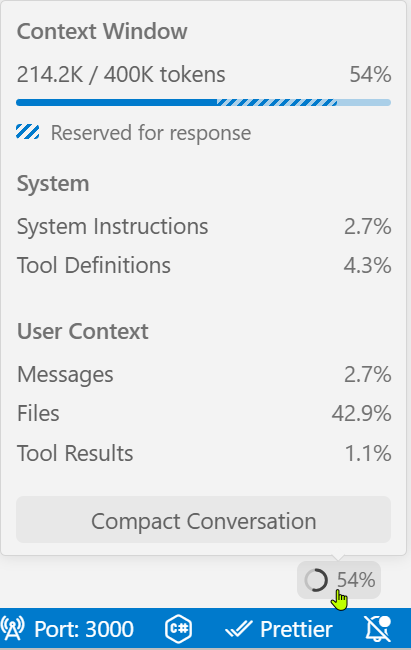
Copilot context window screenshot
Component 05 14 / 31
05

Structured Session Memory

Two layers: a durable transcript and a lighter working memory.

05 · Structured Session Memory 15 / 31

Prompt-time vs. storage-time history

Context Reduction asked how much past goes into the next turn. Structured Session Memory asks what the agent keeps over time.

Concept · two session layers

Transcript + working memory
  • Full transcript — append-only record of every request, tool call, and reply. Resumable.
  • Working memory — a small, explicitly maintained summary of the current task and key files.
  • Usually persisted as JSON on disk so sessions survive a crash.
  • Different jobs: transcript for reconstruction, memory for continuity.

Copilot in VS Code

Chat history & pinned guidance
  • Chat sessions persist across restarts — any past chat can be reopened and continued.
  • AGENTS.md, copilot-instructions.md, scoped *.instructions.md, and user-level instructions act as stable long-term memory.
  • Custom agents bundle a system prompt and tool allow-list as a durable preset.
  • Prompt files save reusable task recipes to the repo itself.
Component 06 16 / 31
06

Delegation with Subagents

Spawn a child for the side question — but bind it tightly.

06 · Delegation with Subagents 17 / 31

The important part is not launching a helper agent, but controlling exactly what it can do.

Main agent
Owns the task
  • Full tool access
  • Read & write the workspace
  • Keeps the long-running transcript
delegate · bounded
Subagent
One side question
  • Inherits just enough context
  • Read-only or scoped tools
  • Limited recursion depth & time
  • Returns a summary, then exits

Copilot in VS Code

Agent mode, tasks,
and Copilot coding agent
Agent mode
Runs a local observe → act loop inside the editor, with tool calls and edits scoped to the workspace.
MCP subtasks
External MCP servers can expose scoped tool sets that behave like bounded helpers.
Copilot coding agent
Full tasks can be handed off to a cloud agent that opens a pull request — the ultimate “bounded delegation.”
Customization VS Code + GitHub Copilot 18 / 31

Customizing the coding harness

VS Code + GitHub Copilot expose eight levers for shaping the six components of a coding agent to your project, your standards, and your workflow.

01
Instructions
02
Prompt Files
03
Custom Agents
04
Agent Skills
05
Language Models
06
MCP
07
Hooks
08
Plugins
Customization VS Code + GitHub Copilot · 01 / 0819 / 31
01 · Instructions

Teach the AI your coding standards

What it is

Markdown rules, auto-attached
  • Always-on.github/copilot-instructions.md applies to every request.
  • File-based*.instructions.md with an applyTo glob targets specific file types or folders.
  • Run /init in chat to bootstrap an instructions file tailored to your codebase.

Harness impact

Stabilizes the prefix
  • Directly reinforces Live Repo Context — instructions become canonical workspace facts.
  • Feeds Prompt Shape & Cache Reuse — a cacheable stable block the runtime can reuse across turns.
  • Acts as durable long-term memory in Structured Session Memory — team conventions survive every new chat.
Customization VS Code + GitHub Copilot · 02 / 0820 / 31
02 · Prompt Files

Repeatable tasks as slash commands

What it is

A .prompt.md per task
  • Reusable Markdown that encodes a specific task and appears as a slash command in chat.
  • Can reference specific files, tools, and context so the AI starts with everything it needs.
  • Good for scaffolding a component, generating tests, or drafting a PR description.

Harness impact

Turns prose into a tool call
  • Bridges Prompt Shape & Cache Reuse and Structured Tools & Permissions — a saved prompt behaves like a named action.
  • Cuts repeated context assembly; the runtime pulls the exact files the prompt names, not a guess.
  • Shrinks the token footprint of routine work, helping Context Reduction.
Customization VS Code + GitHub Copilot · 03 / 0821 / 31
03 · Custom Agents

Specialized personas, connected by handoffs

What it is

One .agent.md, one role
  • A named persona — security reviewer, planner, implementer — defined by behavior, tool allow-list, and model preference.
  • Defined in a single Markdown file; frontmatter declares tools, model, and allowed subagents.
  • Selectable from the chat agents dropdown or invoked as a subagent by another agent.

Harness impact

Shapes tools and delegation
  • Narrows Structured Tools & Permissions — a reviewer can be restricted to read-only tools, never edit.
  • Is the primary mechanism for Bounded Subagents — each agent brings its own stable prefix and model.
  • Handoffs chain agents into guided sequential workflows — see next slide.
Customization VS Code + GitHub Copilot · 03 / 08 · Handoffs22 / 31
03a · Handoffs

Guided, sequential workflows between agents

After a chat response completes, a handoff button appears. One click switches to the next agent with relevant context and a pre-filled prompt — the user stays in control of each step.

A typical chain

Agent · Planner
Read-only tools. Produces an implementation plan.
Handoff · “Start Implementation”
Agent · Implementer
Edit tools unlocked. Executes the plan.
Handoff · “Review for Security”
Agent · Reviewer
Audits the diff for vulnerabilities.

Declared in frontmatter

---
name: Planner
tools: [search, web/fetch]
handoffs:
  - label: Start Implementation
    agent: implementer
    prompt: Implement the plan.
    send: false
---
Delegation ≠ handoff
A subagent runs inside a turn. A handoff ends the turn and gives the user a button.
Why it matters
Review and approve at every boundary — automation with oversight.
Customization VS Code + GitHub Copilot · 04 / 0823 / 31
04 · Agent Skills

Multi-step workflows with scripts

What it is

A folder with instructions + scripts
  • Packages a domain task — API docs, security audit, DB migration — as instructions plus executable helpers.
  • Built on an open standard so the same skill works across agent types; see skills.sh.
  • Loads on demand when the task matches the skill description.

Harness impact

Lazy-loaded capability
  • Heavier than a prompt file, cheaper than an always-on tool — solves a Context Reduction tradeoff.
  • Extends Structured Tools & Permissions with deterministic scripts the agent doesn't have to re-derive each time.
  • Acts less like a true Bounded Subagent and more like a lazily loaded capability pack — load it when relevant, keep the result or summary.
Customization VS Code + GitHub Copilot · 05 / 0824 / 31
05 · Language Models

Pick the right engine per task

What it is

Swap the model, keep the harness
  • Choose different models for different chats, modes, or custom agents.
  • Bring-your-own API key unlocks additional providers beyond the defaults.
  • A reasoning-heavy model for planning, a fast model for inline edits.

Harness impact

Matches cost to job
  • The harness stays identical — tools, instructions, memory all the same — only the engine swaps.
  • Lets you run expensive reasoning models only where they earn it, keeping turns cheap elsewhere.
  • Per-agent model selection pairs naturally with Bounded Subagents — cheap model for the helper.
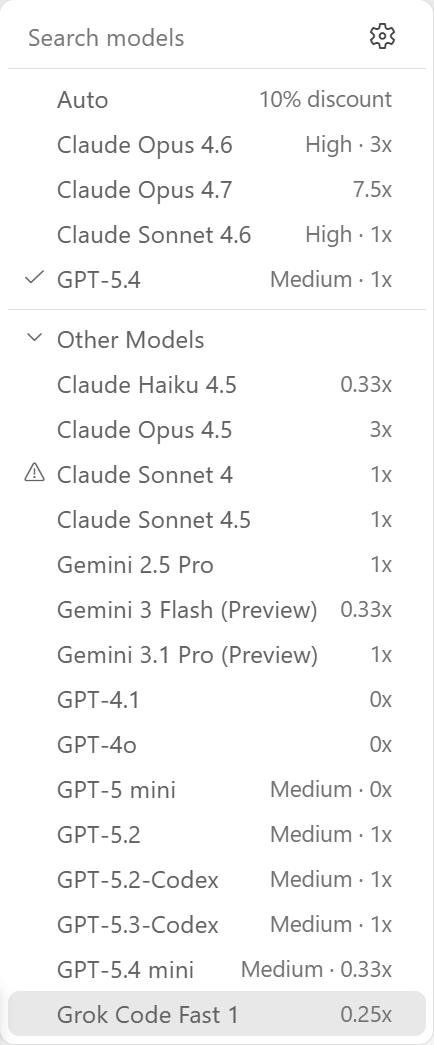
Model selection menu
Customization VS Code + GitHub Copilot · 06 / 0825 / 31
06 · MCP

Connect external tools and data

What it is

Model Context Protocol servers
  • An open standard for exposing tools, resources, and prompts to any MCP-aware agent.
  • Servers can run locally or remotely and reach databases, APIs, cloud services, and more.
  • Tools appear in the harness's tool list just like built-ins.

Harness impact

Grows tool reach without rebuilding it
  • Without MCP the agent can only work with code and the terminal — MCP extends its reach.
  • Every new server inherits the harness's validation, approval, and logging — no ad-hoc plumbing.
  • Pairs with custom agents to scope which MCP tools a given persona can use.
Customization VS Code + GitHub Copilot · 07 / 0826 / 31
07 · Hooks

Deterministic code at lifecycle points

What it is

Shell commands on events
  • Run a formatter after every file edit, block commits that fail a lint check, or log every tool call for audit.
  • Instructions guide what the AI does; hooks guarantee what actually runs.
  • Triggered at defined points in the agent's session lifecycle.

Harness impact

Adds non-negotiable steps
  • Closes gaps in Structured Tools & Permissions — enforce a policy the model cannot skip.
  • Runs outside the LLM loop, so hook cost is flat — doesn't inflate context or token spend.
  • A natural companion to “approval gates” — trust the model more, verify with code.
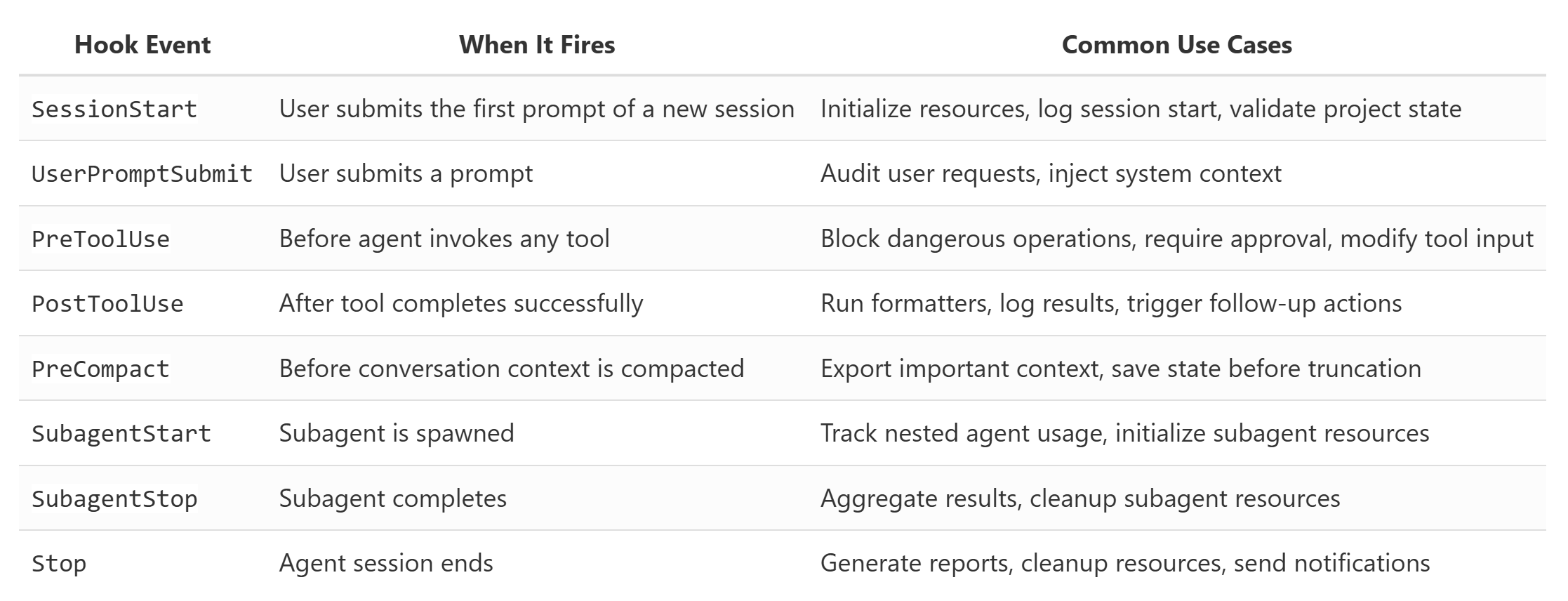
Hook events table
Customization VS Code + GitHub Copilot · 08 / 0827 / 31
08 · Agent Plugins

Install pre-packaged bundles

What it is

A bundle of the other seven
  • Discoverable bundles from plugin marketplaces (awesome-copilot.github.com).
  • A single plugin can ship slash commands, skills, custom agents, hooks, and MCP servers together.
  • Good for adopting community best practices or sharing internal tooling.

Harness impact

Distribution layer
  • Not a new harness capability — a way to install the seven others as a coherent set.
  • Turns “customize your harness” into a package-manager experience.
  • Makes internal tooling reproducible across an org: one install, same harness.
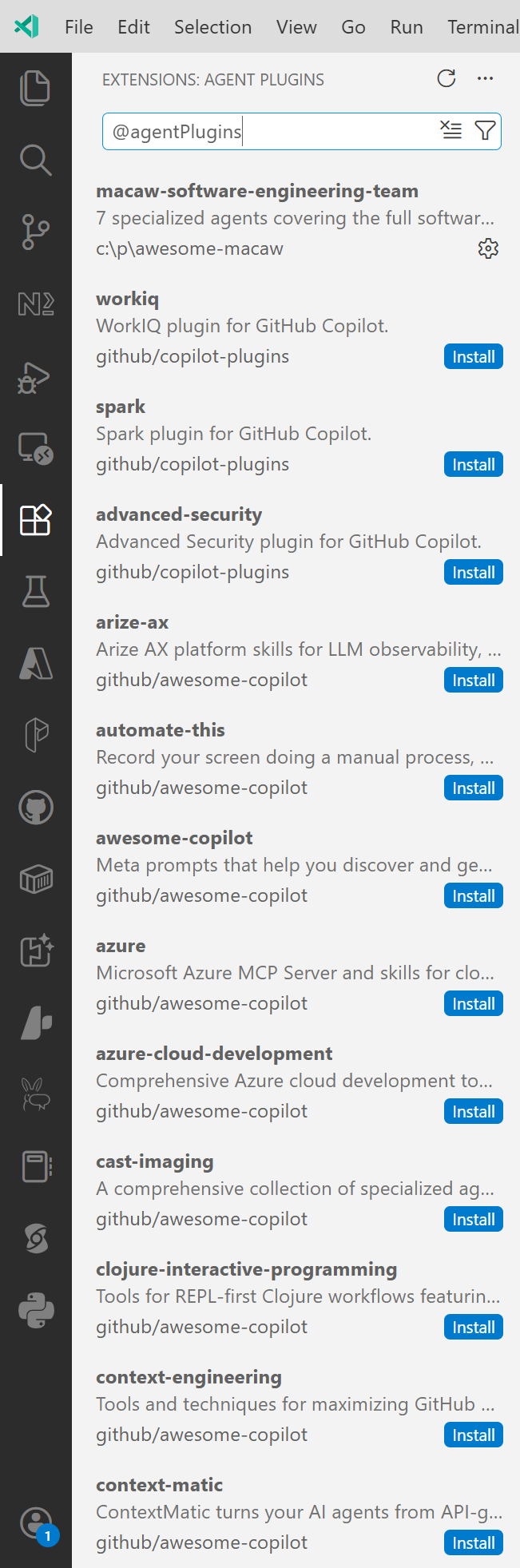
Agent plugins list
Customization VS Code + GitHub Copilot28 / 31

Customization VS Code + GitHub Copilot
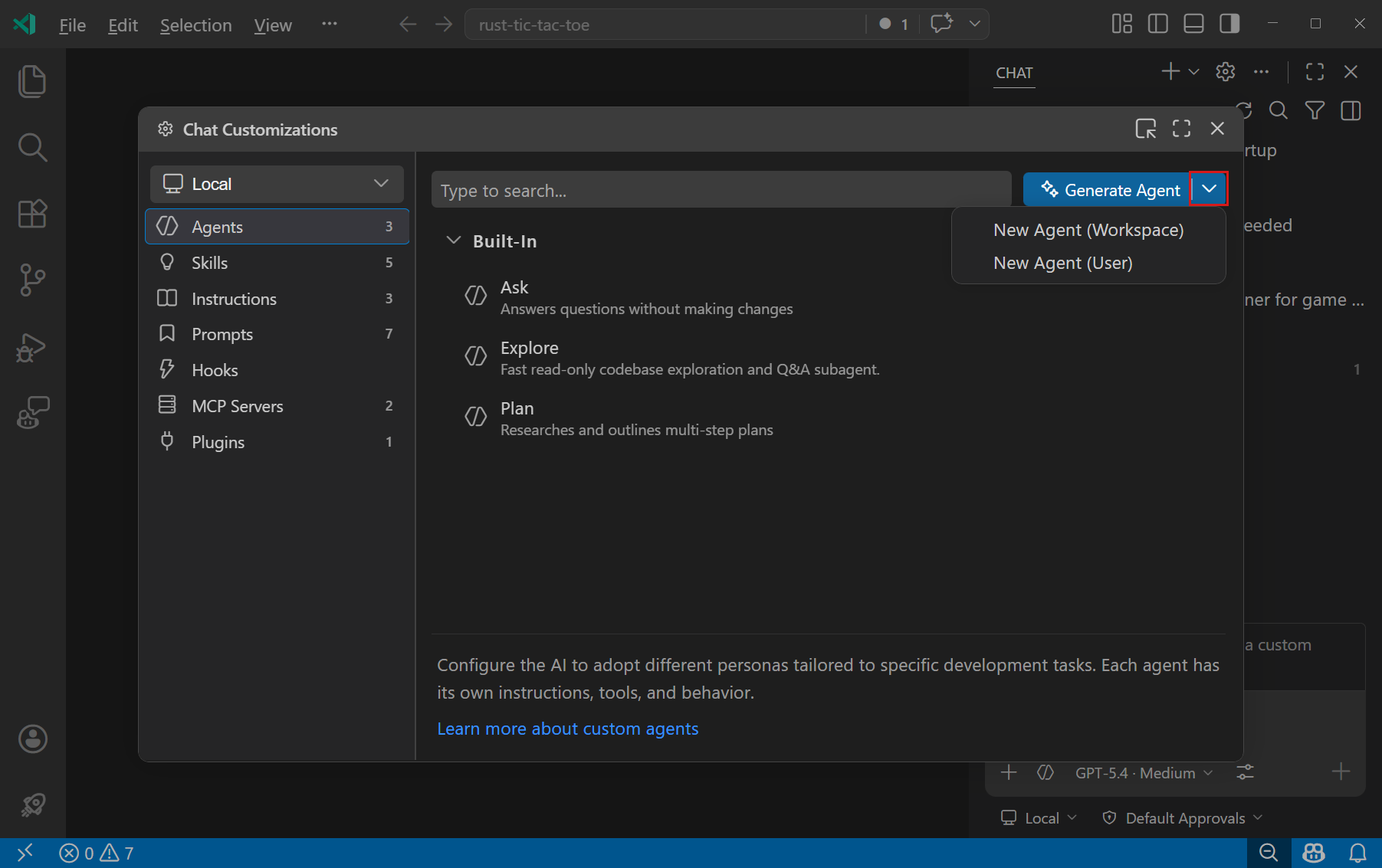
Create custom agent dialog
Synthesis29 / 31

The eight levers, and which components they shape

Customization Primary purpose Components strengthened
01InstructionsProject-wide rules & standardsLive Repo Context · Prompt Shape & Cache Reuse · Structured Session Memory
02Prompt FilesSlash commands for repeat tasksPrompt Shape & Cache Reuse · Structured Tools & Permissions · Context Reduction
03Custom AgentsPersonas with scoped toolsStructured Tools & Permissions · Bounded Subagents
04Agent SkillsMulti-step capability packsStructured Tools & Permissions · Context Reduction · Bounded Subagents
05Language ModelsEngine per taskCross-cutting · pairs with Bounded Subagents
06MCPExternal tools & dataStructured Tools & Permissions (reach beyond local)
07HooksDeterministic lifecycle codeStructured Tools & Permissions · Context Reduction
08PluginsBundled distributionAll of the above
Synthesis 30 / 31

The six, side by side

Concept What it does In GitHub Copilot / VS Code
01 Live Repo Context Stable facts about the workspace #codebase, @workspace, instruction files
02 Prompt Shape & Cache Stable prefix vs. changing tail copilot-instructions.md, .prompt.md, context vars
03 Structured Tools Named tools, validated, approved Ask / Edit / Agent modes, built-in tools, MCP
04 Context Reduction Clip, dedupe, summarize Summarize Conversation, new-chat reset
05 Session Memory Transcript + working memory Persisted chats, custom modes, user instructions
06 Bounded Subagents Delegated side tasks with limits Agent mode, MCP subtasks, Copilot coding agent
Close 31 / 31

Three takeaways

01
The harness is the product.
Once top models are close in raw capability, context, tools, and state-management are what differentiate one coding tool from another.
02
Context quality beats raw context length.
Longer windows help, but compaction, deduplication, and a stable prefix matter more than token count alone.
03
Copilot in VS Code shows all six patterns.
Instruction files, tool modes, summarization, persisted chats, and agent delegation each map cleanly to one of the six components.